
Do You Really Need Three Cameras for a Professional Podcast?
You have two people sitting across from each other, a couple of microphones, good lighting and a quiet room. Everything seems ready for a professional podcast recording. But there is still one practical question: Do You Really Need Three Cameras for a Professional Podcast?
One camera can feel too limiting, while two may seem like a reasonable starting point. Three cameras, however, can create a more professional-looking production. But does adding a third camera automatically make a podcast look better?
Not necessarily.
As Athens Pulse explores, a three-camera setup can improve the visual flow of a video podcast, especially when the format involves a conversation between a host and a guest. It gives the editor more flexibility, makes cuts easier to hide and can make a long discussion feel more dynamic.
However, three poorly positioned or badly configured cameras can also add unnecessary work without noticeably improving the final result.
The real question is not simply whether three cameras are better than two. It is what each camera adds to the production and whether it serves a useful purpose in the final edit.
What does a three-camera podcast setup usually look like?
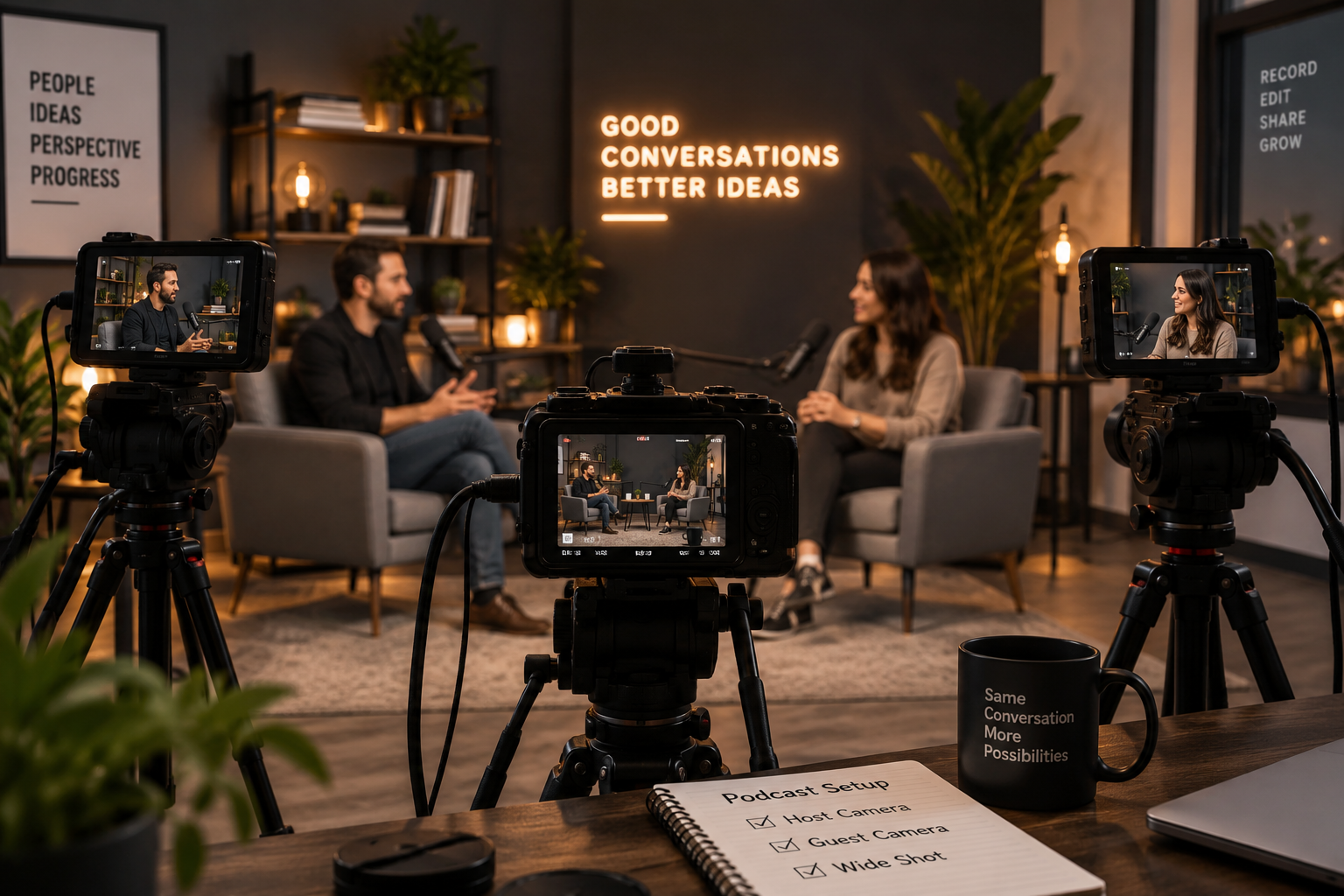
For a traditional two-person podcast, a simple three-camera setup usually includes one camera focused on the host, another focused on the guest and a third camera capturing a wider shot of both participants.
This arrangement creates three distinct perspectives. When the host is speaking, the editor can use the host camera. When the guest responds, the edit can move to the guest angle. Whenever the conversation becomes more interactive, the wide shot can bring both people into the frame and show the relationship between them.
The result is not automatically more cinematic simply because there are three cameras in the room. What the setup really provides is choice, and that choice can be extremely valuable during podcast production.
Why the wide shot matters more than it seems
At first, the third camera may appear to be the least important one. If there is already one camera pointing at each speaker, it is reasonable to wonder why another camera is needed to show both of them.
The answer is that the wide shot can solve several problems at the same time.
Imagine that the guest finishes an answer and both participants start laughing. A close-up of only one person will miss part of that interaction, while the wide shot can capture the moment naturally. The same shot can also be useful when the editor needs to remove a section from the middle of an answer. Cutting directly between two clips from the same camera may create an obvious visual jump, whereas switching briefly to the wide shot can make the edit feel much smoother.
The third camera, therefore, is not simply another perspective. It also functions as an editing tool.
Three cameras can make editing easier, not just prettier
One of the most important advantages of a multi-camera podcast setup is the additional flexibility it offers in post-production.
Suppose the host asks, “Tell me how the project started?” The editor cuts to the guest, who begins answering. Halfway through the response, however, the answer becomes too long and a section needs to be removed. If only one camera is available, that edit may result in a visible jump cut. With multiple camera angles, the editor can cover the cut by switching to another shot, allowing the audience to follow the conversation without noticing that anything has been removed.
This becomes even more useful when the editor needs to correct long pauses, repeated sentences, small interruptions, coughs, moments when someone checks their notes or sections that simply need to be shortened.
The additional camera is not just creating more footage. It is creating more options in post-production.
But do you actually need three?
Not always.
A solo podcast may work perfectly well with one camera, while a simple interview can look professional with two. If the final video is mainly intended to be divided into short social media clips, three full camera angles may also be unnecessary.
The number of cameras should follow the format and the way the content will be used. For a two-person conversational podcast, however, three angles offer a particularly useful balance: one shot for each participant and one shared shot. The setup remains relatively simple to manage while providing enough visual variety for a long-form conversation.
Two cameras can still be enough
If you have only two cameras, you can frame one on the host and the other on the guest. This is a perfectly workable arrangement, especially when the conversation is structured and the participants remain relatively still.
The main thing you lose is the shared shot. Alternatively, one camera can capture a wide shot while the second focuses on whichever speaker is most important at a given moment. That approach can also work, although it provides less flexibility during editing.
There is another option if you record in high resolution. A wider 4K shot can sometimes be cropped during post-production to create additional framing, particularly when the final video is delivered at 1080p. This can make a two-camera setup feel more flexible than it actually is.
Digital cropping, however, is not a complete replacement for another physical camera. A real third camera can have its own position, focal length and perspective. A crop cannot.
One 4K camera can sometimes create two shots
This is where modern production becomes particularly interesting. Imagine recording a wide two-person shot in 4K while delivering the final podcast in 1080p. During editing, you may be able to use the original wide frame, a crop toward the host and another crop toward the guest.
Technically, one recording has created several usable compositions. For a small production, this can be extremely useful and may reduce the need for additional equipment.
There are, however, important limitations. The camera position remains exactly the same, so the perspective does not change. Aggressive cropping also reduces framing freedom, and if the original shot was not composed with cropping in mind, the artificial close-ups may not look particularly natural.
In other words, 4K gives you flexibility, but it does not magically turn one camera into a true three-camera production.
Smartphones have changed the equation
A professional-looking multi-camera podcast no longer requires three traditional video cameras. Modern smartphones can record high-quality 4K video, and using several matching or similar phones can make a small studio considerably easier to build.
This is especially attractive for businesses, independent creators and small media teams that do not have a dedicated camera operator. Three phones can remain mounted in fixed positions: one for the host, one for the guest and one for the wide shot.
Once framing, exposure, white balance and recording settings have been configured correctly, the setup can become largely repeatable. This is one reason the line between a traditional video studio and a compact creator setup has become increasingly blurred.
Techrow.gr will explore this practical side in “Three-Camera Podcast Setup: How to Position Your Cameras,” looking at camera placement, framing and the role of each angle in a compact podcast studio.
Matching the cameras matters
Using three cameras also introduces a new challenge: all three need to look as though they belong to the same production.
If one camera produces a very warm image, another is significantly darker and the third constantly changes exposure, every cut becomes more noticeable. For this reason, consistency matters just as much as the number of cameras.
Ideally, the cameras should use matching resolution, frame rate, white balance, exposure and general image settings. Using identical camera models can simplify the process, although it is not strictly necessary.
The goal is to avoid a situation in which the viewer immediately notices a dramatic visual change every time the angle switches. The cameras do not have to produce perfectly identical images straight out of the device, but the closer they are, the easier the post-production process becomes.
Lock what you can
Automatic settings are convenient when recording everyday video. In a controlled podcast studio, however, constant automatic adjustments can become distracting.
For example, the host may move slightly in the frame and cause the camera to change brightness. The white balance may shift during the conversation, or the focus may briefly search for another subject. These small changes can become particularly obvious when the edit moves from one camera to another.
Whenever possible, locking important settings can make the footage more consistent throughout a long recording. This becomes even more valuable when several cameras are recording simultaneously, because consistency makes multicamera editing much easier.
The cameras need to agree on frame rate
If one camera records at 30 fps and another at 25 fps, you have created an unnecessary post-production problem. The same applies if one device changes recording mode or uses a setting that does not match the rest of the production.
Before recording, check every camera and confirm that the resolution, frame rate, orientation, white balance and exposure are consistent. It is also important to verify that every device has sufficient storage and enough battery power or continuous power for the entire session.
These checks may sound basic, but a three-camera setup also means three opportunities for something to be configured incorrectly.
How do you synchronize three cameras?
One of the oldest production tricks remains extremely useful when recording a multi-camera podcast.
Before the conversation begins, make sure that every camera and the audio recorder are already recording. Then create one clear, sharp sound. A hand clap works perfectly because it produces two useful references: visually, you can see the exact moment when the hands meet, while in the audio waveform you can identify a clear spike.
During editing, these points can be aligned across the different recordings. Modern editing software can also synchronize clips automatically using their audio waveforms, which can make the process significantly faster.
Even so, having a clear manual sync point at the beginning remains a very useful safety measure.
Audio is still more important than the third camera
This may sound strange in an article about cameras, but it is worth emphasizing. If your budget allows you to improve only one part of the podcast setup, adding another camera should not automatically be the priority.
Viewers can often accept a simple visual setup. Poor audio is much harder to tolerate. A podcast with two cameras and clear, consistent voices will usually feel more professional than a three-camera production with echo, clipping, background noise or microphones placed too far away.
The camera setup should support the conversation. It should not distract from the fundamentals.
More cameras also mean more things that can go wrong
Three cameras provide flexibility, but they also introduce complexity. You now need to think about three batteries, three storage capacities, three recording files, three possible overheating issues and three sets of camera settings. You also have three devices that need to remain recording throughout the session.
This is why a reliable two-camera setup can be better than an unreliable three-camera setup. Before adding another device, ask whether your workflow can support it consistently.
Professional production is not defined by the maximum amount of equipment in the room. It is defined by whether the equipment works reliably together.
What about a business podcast studio?
For a business that plans to publish video podcasts regularly, the calculation is slightly different. The goal is not simply to produce one good episode. It is to create a setup that can produce episode after episode without rebuilding the studio every time.
That makes fixed camera positions particularly attractive. Once the framing has been tested, the cameras can remain mounted, the lighting can stay in place and the recording process can become standardized. The studio then becomes a repeatable workflow rather than a new production challenge every week.
This also raises a broader question: when does building an internal studio actually make financial and operational sense?
Market Insiders will examine that question in “When Does a Small Business Need Its Own Podcast Studio?”, focusing on the business case behind bringing recurring video production in-house.
More angles also create more content
A podcast today rarely ends with the full episode. The same recording may later become YouTube clips, Instagram Reels, TikTok videos, LinkedIn posts, short promotional videos or excerpts embedded in articles.
Multiple camera angles give editors more flexibility when repurposing the conversation. A close-up may work better for a vertical clip, while a wide shot can establish the setting. A reaction from the other participant may also make a short exchange more engaging.
The production value of multiple cameras therefore extends beyond the full podcast episode. It can affect the amount and variety of content that can be created from the same recording session. This is where podcast production starts to overlap with content strategy.
Targeted.gr will explore this perspective in “Why Video Podcasts Need More Than Just Good Content,” looking at how presentation, distribution and repurposing influence the marketing value of a video podcast.
So, what is the ideal setup?
For a traditional two-person video podcast, three cameras are a very strong starting point: one medium or close shot of the host, one medium or close shot of the guest and one wider shot showing both participants.
But “ideal” does not mean mandatory. If the budget supports only two cameras, start with two. If the podcast is solo, one may be enough. If you already record in 4K, strategic cropping can provide additional flexibility.
The important thing is that every camera has a reason to exist. Do not add a third camera simply because three sounds more professional. Add it because you know which shot it will provide and how that shot will improve the final edit.
A professional podcast is a system, not a camera count
It is easy to judge a podcast studio by the equipment we can see: three cameras, large microphones, lights, monitors and an audio mixer.
But professional production is really the result of a system. The cameras need consistent settings, the lighting needs to work across every angle, the audio needs to be clean and the recordings need to synchronize. The editor also needs enough coverage to shape the conversation, while the entire process needs to be reliable enough to repeat for the next episode.
Three cameras can be an excellent part of that system, but they are not the system itself.
So, do you really need three cameras for a professional podcast?
No.
For a two-person video podcast, however, three well-planned camera angles can offer one of the best combinations of simplicity, editing flexibility and visual variety. That makes the third camera much more than an extra piece of equipment. It becomes another tool for telling the conversation.
Frequently Asked Questions
How many cameras do you need for a two-person podcast?
Two cameras can be enough, but three provide greater editing flexibility. A common setup uses one camera for the host, one for the guest and a third wide shot showing both participants.
Can smartphones be used for a multi-camera podcast?
Yes. Modern smartphones can record high-quality video and can work well in fixed multi-camera podcast setups, particularly when their resolution, frame rate, exposure and white balance are configured consistently.
Can one 4K camera replace multiple cameras?
A 4K recording can be cropped to create additional framing when the final output is lower resolution, such as 1080p. However, cropping does not provide the different perspective of a physically separate camera.
How do you synchronize multiple podcast cameras?
A clear clap at the beginning of the recording provides a visible moment and an audio waveform spike that can be aligned during editing. Many editing applications can also synchronize recordings automatically using audio.
Is audio more important than having three cameras?
For most podcasts, yes. Clear, consistent audio should generally take priority over adding another camera. A simpler visual setup with strong audio can feel far more professional than a complex multi-camera production with poor sound.